
Are you tired of juggling numbers and struggling to keep your finances in order? Choosing the right accounting software can change everything.
It saves you time, reduces errors, and gives you a clear picture of your money. But with so many options out there, how do you know which one fits your needs best? This list of accounting software will guide you to the perfect tool that matches your business or personal finances.
Keep reading—you’re just a few clicks away from making your financial tasks easier and smarter.
Popular Accounting Software
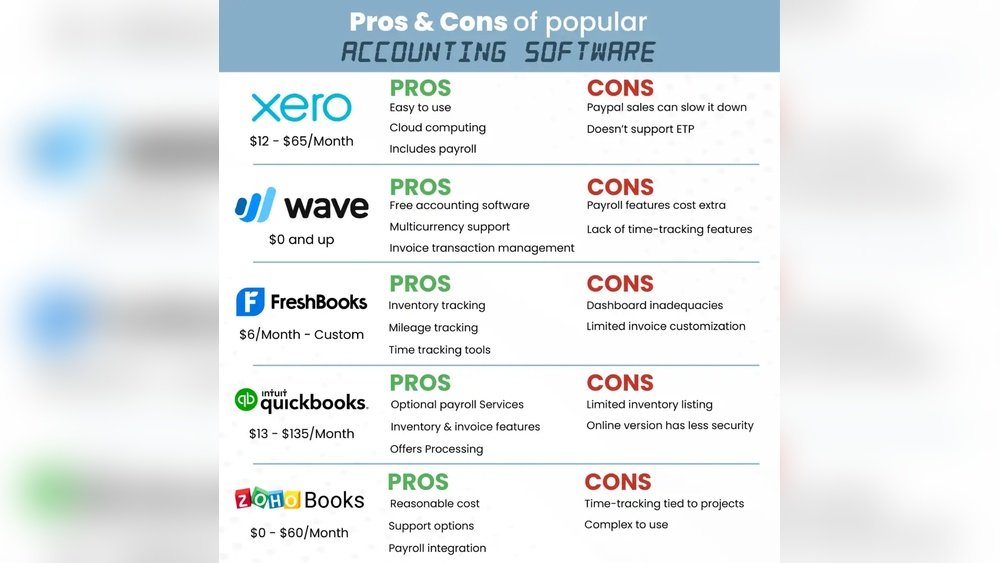
Popular accounting software helps businesses manage their finances easily. These tools offer features like invoicing, expense tracking, and reporting. Many small and medium businesses trust these platforms for smooth accounting tasks. Here are some widely used options that stand out in the market.
Quickbooks
QuickBooks is known for its user-friendly interface. It supports invoicing, payroll, and tax filing. Many businesses use QuickBooks for its reliable customer support. The software suits both beginners and experienced accountants. It offers cloud and desktop versions to fit different needs.
Xero
Xero provides real-time financial data and bank connections. It is popular among small businesses and freelancers. The software includes tools for invoicing, expense claims, and inventory. Xero’s mobile app makes managing accounts easy on the go. It also integrates well with many business apps.
Freshbooks
FreshBooks simplifies invoicing and time tracking. It is ideal for freelancers and small service businesses. The software helps users create professional invoices quickly. Expense management and project tracking are also easy with FreshBooks. It offers strong customer support and simple navigation.
Sage
Sage offers powerful accounting solutions for growing businesses. It covers payroll, tax, and cash flow management. The software is flexible and can handle complex accounting needs. Sage also provides cloud-based options for remote access. Many companies rely on Sage for its advanced features.
Wave
Wave is free accounting software suitable for small businesses. It includes invoicing, receipt scanning, and basic accounting tools. Wave’s simple design makes it easy to use. It also offers paid services like payroll and payment processing. Small business owners appreciate Wave for its cost-effectiveness.

Credit: www.svtuition.org
Features To Consider
Choosing the right accounting software means knowing what features matter most. These features help you manage your finances easily and save time. Focus on tools that fit your business needs and simplify your daily tasks.
Some features help with tracking money. Others support tax work or pay employees. Understanding these options guides you to the best software choice.
Invoicing And Billing
Good software lets you create and send invoices fast. It tracks payments and sends reminders automatically. Clear billing helps keep your cash flow steady.
Expense Tracking
Track all your expenses in one place. Attach receipts and categorize costs easily. This feature prevents missed expenses and helps control budgets.
Payroll Management
Payroll tools calculate wages and deductions accurately. They manage employee hours and generate pay slips. This reduces errors and saves time on payroll tasks.
Tax Preparation
Tax features organize your financial data for easy filing. They calculate taxes owed and prepare reports. This helps avoid mistakes and late penalties.
Reporting And Analytics
Reports show your business’s financial health clearly. Analytics identify trends and areas needing attention. These insights support better decisions and growth.
Software For Small Businesses
Choosing the right accounting software helps small businesses manage money well. It saves time and reduces mistakes. Many programs fit small business needs. They handle invoices, expenses, and taxes simply.
Good software must be affordable, easy to use, and able to grow with the business. These points help find the best tools.
Affordable Options
Small businesses often have tight budgets. Affordable software lets them track finances without high costs. Many programs offer monthly plans under $20. Some even have free versions with basic features. These options help businesses save money while staying organized.
User-friendly Interfaces
Simple interfaces help users learn quickly. Clear menus and easy navigation reduce confusion. Visual dashboards show income and expenses at a glance. This makes daily tasks faster. Even beginners can use the software without stress.
Scalability
Small businesses grow over time. Scalable software adjusts to new needs. It can add more users or features as business expands. This flexibility avoids switching programs later. Businesses stay efficient and ready for growth.
Enterprise-level Solutions
Enterprise-level accounting software offers powerful tools for large businesses. These solutions handle complex financial needs and support many users at once. They help companies manage budgets, taxes, payroll, and reporting easily.
Such software adapts to different industries and business sizes. It ensures smooth workflow and accurate data management. These systems also improve efficiency and reduce errors in accounting tasks.
Advanced Customization
Enterprise solutions allow deep customization to fit unique business needs. Users can adjust workflows, reports, and dashboards. This flexibility helps match the software to specific company processes.
Customization supports different currencies, languages, and tax rules. It also enables setting user roles and permissions clearly. This control ensures only authorized people access sensitive data.
Integration Capabilities
Top enterprise software connects easily with other business tools. It links with CRM, payroll, inventory, and ERP systems. This connection reduces manual data entry and errors.
Integration helps create a unified system for all departments. It improves communication and data sharing across teams. This leads to faster decision-making and better financial insights.
Security Features
Security is critical in enterprise accounting software. These systems use encryption to protect data during transmission and storage. They also offer multi-factor authentication for user access.
Regular backups and disaster recovery plans keep data safe. Audit trails track all changes and user activities. This transparency helps companies stay compliant with laws and regulations.
Cloud-based Vs Desktop Software
Choosing between cloud-based and desktop accounting software is important for businesses. Each type offers unique benefits and drawbacks. Understanding these can help you pick the right software for your needs.
Cloud-based software works online. Desktop software runs on your computer. This difference affects how you use the software daily.
Accessibility
Cloud-based software lets you access data from any device with internet. You can work from home, office, or on the go. Desktop software limits access to the device it is installed on. You cannot use it outside that computer. Cloud systems offer more flexibility for remote work.
Data Backup
Cloud-based software usually includes automatic data backup. Your information stays safe even if your device breaks. Desktop software requires manual backups. If you forget to back up, you risk losing data. Cloud systems reduce data loss risks and save time.
Cost Implications
Cloud-based software often uses subscription fees. You pay monthly or yearly. Desktop software usually has a one-time purchase cost. Cloud fees might add up over time. Desktop software may have higher initial costs but no ongoing fees. Consider your budget and payment preferences.
Mobile Accounting Apps
Mobile accounting apps bring accounting tools to your fingertips. They help manage finances anytime and anywhere. These apps suit small businesses and freelancers needing quick access to data. Mobile apps simplify tasks like invoicing, expense tracking, and financial reporting.
Using mobile accounting apps means less waiting. Updates happen instantly, keeping records accurate and current. The convenience of these apps saves time and effort daily.
On-the-go Access
Access your accounting data from any place. Mobile apps let you check balances and transactions on the move. Update invoices or add expenses during meetings or travel. No need to return to your office or computer.
Real-time Updates
Changes reflect immediately across all devices. Real-time syncing ensures your financial information stays correct. Avoid errors caused by delayed data entry. Teams can collaborate smoothly with live updates.
App Compatibility
Most mobile accounting apps work on iOS and Android devices. They fit smartphones and tablets of various sizes. Choose apps that match your device for the best experience. Easy installation and user-friendly interfaces make using them simple.
Pricing Models Explained
Choosing the right accounting software depends a lot on its pricing model. Understanding these pricing options helps businesses pick what fits their budget and needs. Accounting software usually comes with different ways to pay, each with its own benefits and limits.
Subscription Plans
Subscription plans charge a monthly or yearly fee. This fee often includes updates and customer support. Businesses pay regularly and get access to the latest software versions. These plans suit companies wanting flexibility and ongoing service. Some subscriptions offer multiple tiers, giving more features at higher prices.
One-time Purchase
One-time purchase means paying once for the software license. Users own the software and can use it forever. This model may not include updates or support after buying. It works well for businesses that prefer a single payment over time. Updates usually come as separate purchases.
Free Vs Paid Options
Free accounting software often has basic features for small businesses. It helps new users test the software without cost. Paid options provide more tools, better security, and support. They fit businesses with more complex needs or larger teams. Choosing free or paid depends on business size and demands.

Credit: www.wallstreetmojo.com
Choosing The Right Software
Choosing the right accounting software is important for your business success. The right tool saves time and reduces errors. It helps you manage finances clearly and easily. Focus on what fits your business needs best. Consider software features, ease of use, and cost. This guide helps you decide with simple steps.
Assessing Business Needs
Start by understanding your business size and type. Know how many users will access the software. Identify key features you need, like invoicing or payroll. Consider integration with other tools you use. Think about your budget and future growth plans. Clear needs make choosing easier and more effective.
Trial And Demo Options
Try software before buying. Many offer free trials or demos. Use these to check if it feels right. Test key features and user interface. See how fast and simple it works. Trials help avoid costly mistakes and find the best fit.
Customer Support
Good support is crucial. Problems will come, and quick help matters. Check if support is available by phone, chat, or email. Look for guides, tutorials, and community forums. Reliable support saves time and reduces frustration.

Credit: valueadders.com.au
Frequently Asked Questions
What Is The Best Accounting Software For Small Businesses?
The best accounting software for small businesses offers easy invoicing, expense tracking, and tax filing features. Popular options include QuickBooks, Xero, and FreshBooks. These tools simplify financial management and save time, helping small businesses stay organized and compliant.
How Does Accounting Software Improve Financial Accuracy?
Accounting software automates calculations and reduces human errors. It ensures accurate data entry and real-time updates. This leads to reliable financial reports and helps businesses make informed decisions based on precise information.
Can Accounting Software Integrate With Other Business Tools?
Yes, many accounting software solutions integrate with CRM, payroll, and inventory systems. Integration streamlines workflows and enhances data consistency. This connectivity improves efficiency by syncing financial data across multiple platforms.
What Features Should I Look For In Accounting Software?
Look for invoicing, expense tracking, bank reconciliation, and tax support features. User-friendly interfaces and cloud accessibility are also important. Choose software that fits your business size and industry needs for optimal results.
Conclusion
Choosing the right accounting software makes managing finances easier. Each tool has unique features and benefits. Think about your business size and needs first. Simple software suits small businesses best. Larger companies may need advanced options. Try free trials to find the best fit.
Good software saves time and reduces errors. Keep your records organized and clear. This list helps you explore popular choices. Start today and improve your financial tracking.
