
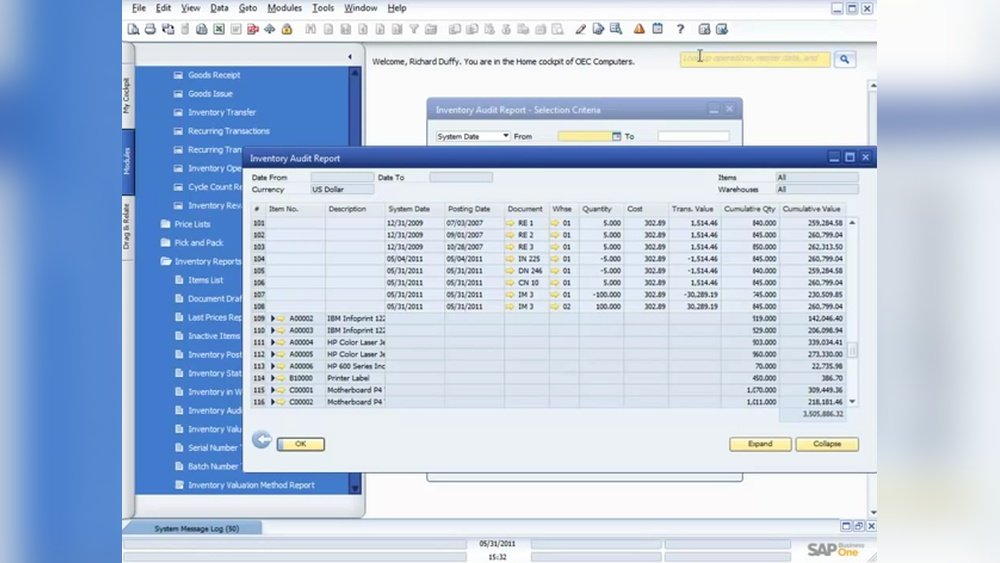
Are you ready to master SAP accounting software without spending a dime? Imagine boosting your career and standing out in the job market by learning one of the most powerful accounting tools used by top companies worldwide.
You might think it’s complicated or expensive, but what if you could start right now, for free? This guide will show you exactly how to learn SAP accounting software step by step, using resources that fit your pace and style.
Keep reading, and you’ll discover simple, effective ways to get started today—no prior experience needed. Your path to becoming SAP-savvy begins here.
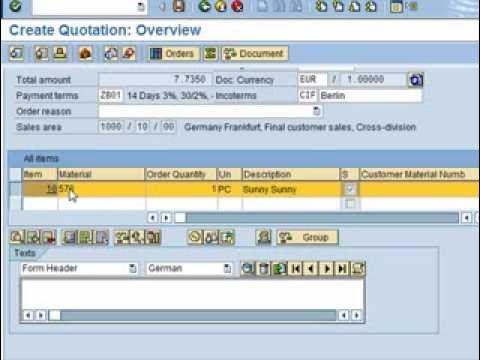
Credit: www.youtube.com
Getting Started With Sap Accounting
Getting started with SAP Accounting is easier than many think. This software helps businesses manage their finances smoothly. Learning it can open up many job opportunities.
This section covers what SAP Accounting is, key features to know, and system needs. These basics will guide you through your free learning journey.
What Is Sap Accounting
SAP Accounting is a tool for managing financial records and transactions. It helps companies track expenses, revenues, and budgets. The software supports tasks like invoicing, tax calculations, and financial reporting.
It is widely used by businesses worldwide to keep their accounts accurate and up-to-date. Learning SAP Accounting means understanding how to handle real business finances.
Key Features To Know
SAP Accounting includes features like general ledger, accounts payable, and accounts receivable. It also offers asset management and financial closing tools. Users can generate detailed financial reports easily.
The software supports multiple currencies and tax rules. It integrates with other SAP modules for complete business management. These features make accounting faster and less prone to errors.
System Requirements
To use SAP Accounting, a computer must meet certain system needs. A stable internet connection is important for cloud versions. The software runs best on Windows or Linux operating systems.
At least 4GB of RAM and 10GB of free disk space are recommended. A modern web browser like Chrome or Firefox helps access SAP easily. Meeting these requirements ensures smooth learning and practice.
Finding Free Learning Resources
Finding free learning resources for SAP Accounting software can save time and money. Many options exist online and offline. Exploring these resources helps build a strong foundation in SAP Accounting. It allows learners to practice skills without financial pressure.
Official Sap Training Options
SAP offers some free training materials on its official site. These include webinars, e-books, and tutorials. Beginners can access basic courses that explain core accounting functions. SAP Learning Hub also provides trial access to some content. This platform helps users learn SAP tools directly from the source.
Free Online Courses And Tutorials
Several websites offer free SAP Accounting courses. Platforms like Coursera, Udemy, and openSAP provide beginner lessons. YouTube channels also share step-by-step tutorials. These resources cover topics like financial accounting and reporting. Videos and articles make learning easy and flexible.
Community Forums And Blogs
Community forums are great places to ask questions and share knowledge. Sites like SAP Community and Reddit have active SAP users. They discuss common problems and solutions. Blogs written by SAP experts offer tips and guides. Engaging with these communities improves understanding and keeps learners updated.
Setting Up A Practice Environment
Setting up a practice environment is essential for learning SAP Accounting software. It gives you a safe space to try features and understand how the system works. Practicing regularly helps you gain confidence and improve your skills without risk. Below are simple ways to create your own SAP practice setup.
Downloading Sap Trial Versions
SAP offers trial versions that you can download for free. These trials usually last 30 days. They include many key features of the full software. After downloading, install the software on your computer. This lets you explore SAP Accounting at your own pace. Make sure your PC meets the system requirements before downloading.
Using Sap Learning Hub Free Access
SAP Learning Hub provides free access to some learning materials. You can find tutorials, e-books, and practice exercises here. This platform helps you understand SAP concepts clearly. It also offers guided learning paths for beginners. Signing up is easy and does not cost anything. Use this resource to study theory and practice side by side.
Setting Up A Sandbox System
A sandbox system is a private SAP environment for testing and learning. You can set it up on your computer or a cloud server. It replicates real SAP settings but does not affect live data. This makes it perfect for hands-on practice. Many SAP users create sandboxes to try out new skills safely. Setting up a sandbox takes some technical steps but is very useful.
Basic Sap Accounting Modules To Focus On
Learning SAP accounting software starts with understanding its key modules. These modules help manage financial data and business processes. Focusing on the basic modules gives you a strong foundation. You can handle essential accounting tasks and explore advanced features later.
Financial Accounting (fi)
The Financial Accounting module records all financial transactions. It helps create financial statements and reports. FI keeps track of assets, liabilities, and equity. This module ensures compliance with legal accounting standards. Understanding FI is crucial for managing company finances properly.
Controlling (co)
The Controlling module supports internal cost management. It helps monitor expenses and revenues within the company. CO allows tracking costs by departments or projects. This module aids in budgeting and financial planning. Learning CO improves your ability to control business costs efficiently.
Accounts Payable And Receivable
Accounts Payable handles money the company owes suppliers. Accounts Receivable tracks money customers owe the company. These modules manage invoices, payments, and credit limits. They ensure smooth cash flow and accurate records. Knowing these modules helps manage daily financial transactions well.
Hands-on Practice Tips
Practicing SAP accounting software is key to learning it well. Hands-on experience helps you understand the tools and functions. It builds confidence and improves your skills faster. Try different exercises and tasks to get familiar with the interface. Practice is the best way to remember commands and processes.
Simulating Real-world Scenarios
Create tasks that mimic real business situations. For example, enter invoices, post payments, or manage assets. This helps you see how SAP handles actual accounting work. Simulations prepare you for tasks you will face in real jobs. They also help you learn problem-solving within the software.
Using Sample Data
Work with sample data sets available in SAP or online. Sample data lets you try features without risking real information. It is safe and easy to reset if you make mistakes. Use this data to practice reports, journal entries, and balance sheets. Sample data builds your confidence and speeds up learning.
Tracking Your Progress
Keep a record of tasks you complete and skills you learn. Note down new functions you try and any challenges faced. Regularly review your notes to see improvement areas. Tracking progress helps you stay motivated and focused. It also shows how much you have learned over time.

Credit: www.sap.com
Joining Sap Accounting Communities
Joining SAP accounting communities is a smart way to learn the software for free. These groups bring together people who share tips, solve problems, and share resources. Being part of such a community helps you stay updated and motivated. You can ask questions and get answers from experts and peers. This interaction speeds up your learning process and builds your confidence.
Benefits Of Networking
Networking in SAP accounting communities opens many doors. You meet professionals who have real experience with the software. They share advice that books or videos often miss. You get support during tough learning phases. Networking also helps you find free learning materials. It creates chances for collaboration on projects or internships. This hands-on experience is valuable for beginners.
Popular Forums And Groups
Several online forums focus on SAP accounting topics. SAP Community Network (SCN) is one of the largest platforms. It offers discussions, blogs, and tutorials. LinkedIn groups also have active SAP accounting members. Facebook has groups where beginners and experts exchange tips. These places are easy to join and free to use. Regular participation helps you learn faster and stay connected.
Attending Webinars And Meetups
Webinars and meetups provide live learning and interaction. Experts explain complex topics in simple ways. You can ask questions and get instant feedback. Meetups allow face-to-face or virtual networking. They often include practical demonstrations. Many webinars are free and open to all. Joining these events keeps your skills sharp and current.
Additional Free Tools And Resources
Free tools and resources help learners gain practical skills in SAP accounting software. These resources offer flexible ways to study at your own pace. They cover basics to advanced topics without cost.
Using these tools, you can practice and understand SAP software better. They provide real examples and tutorials. This makes learning easy and effective.
Youtube Channels
YouTube has many channels teaching SAP accounting for free. Videos show step-by-step processes and screen demonstrations. You can pause and replay as needed.
Channels like “SAP Learning” and “Michael Management” offer clear tutorials. They explain concepts simply and use real SAP screens. Video lessons help remember tasks easier.
E-books And Pdfs
Many websites provide free e-books and PDFs on SAP accounting. These documents cover theory and practical guides. You can download and read offline anytime.
E-books often include screenshots and examples. They help understand complex topics clearly. PDFs are perfect for learners who prefer reading at their own speed.
Mobile Apps For Learning
Mobile apps make learning SAP accounting convenient. You can study anytime using your phone or tablet. Apps provide quizzes, flashcards, and interactive lessons.
Some apps also simulate SAP software tasks. This hands-on practice improves skills quickly. Learning on mobile fits well into busy schedules.

Credit: www.svtuition.org
Next Steps After Free Learning
After learning SAP accounting software for free, the next steps shape your path forward. Building on your basics helps deepen your skills. It prepares you for real-world use and career growth.
Focus on structured learning and practical experience. This approach makes your knowledge stronger and more useful.
Certification Paths
Getting certified proves your SAP accounting skills. Certifications show employers you know the software well. Choose from certifications like SAP Certified Application Associate. They match different skill levels and job roles. Prepare with official study guides and practice exams. Certification increases your chances of job success.
Advanced Courses
Advanced courses expand your SAP knowledge. Learn about complex functions and integration with other modules. Topics include financial reporting, asset management, and controlling. Many online platforms offer affordable or free advanced lessons. These courses help you handle more tasks at work. They also boost your confidence with the software.
Job Preparation Tips
Create a strong resume highlighting your SAP skills. Include projects or practical experience gained during learning. Practice common interview questions about SAP accounting. Join SAP forums and groups to connect with professionals. Gain experience by volunteering or doing internships. Keep updating your skills with new SAP versions and tools.
Frequently Asked Questions
What Is The Best Way To Learn Sap Accounting Software Free?
The best way is to use free online tutorials and SAP’s official learning platform. Practice with free trial versions to gain hands-on experience. Join forums and communities to solve doubts and stay updated.
Are There Free Sap Accounting Software Courses Available Online?
Yes, many websites offer free SAP accounting courses. Platforms like OpenSAP and YouTube provide beginner-friendly lessons. These courses cover essential modules and practical exercises for better understanding.
How Long Does It Take To Learn Sap Accounting Software For Free?
Learning time varies but generally takes 1 to 3 months. Consistent daily practice and completing tutorials speed up the process. Mastery depends on your prior accounting knowledge and software familiarity.
Can I Practice Sap Accounting Software Without Buying It?
Yes, you can use free SAP trial versions or access SAP Learning Hub’s free editions. These options let you practice real SAP environments without any cost or installation hassles.
Conclusion
Learning SAP accounting software for free is possible with the right steps. Start by using free online tutorials and videos. Practice regularly to build confidence and skills. Join forums and groups to ask questions and share ideas. Use trial versions of SAP to get hands-on experience.
Stay patient and keep learning every day. This way, you can gain useful knowledge without spending money. Keep your goals clear and enjoy the learning journey. Success comes with effort and time.
