
Are you struggling to figure out how to handle software development costs in your accounting? You’re not alone.
Many businesses find it confusing to classify and track these expenses correctly. Getting it right is crucial—not just for accurate financial records, but also for making smart decisions that can save you money and boost your growth. You’ll discover clear, step-by-step guidance on how to account for software development costs without the headache.
Keep reading, and you’ll gain practical tips that make your accounting simpler and your business stronger.
Classifying Software Development Costs
Classifying software development costs is key to managing budgets well. It helps to know which costs add value to the company and which are ongoing expenses. Clear classification improves financial reporting and decision making. This section breaks down the main ways to classify these costs.
Capital Vs Expense Costs
Capital costs create lasting value. These include buying software or building new systems. They appear as assets on the balance sheet. Expense costs cover daily operations. They include maintenance, support, and updates. These costs show up on the income statement. Knowing the difference helps with tax and accounting rules.
Direct And Indirect Costs
Direct costs link directly to a project. Examples are developer salaries and software licenses. Indirect costs support projects but do not link to one. Office rent and utilities count here. Tracking direct costs shows true project expenses. Managing indirect costs controls overall spending.
One-time And Recurring Costs
One-time costs happen once, like buying equipment or initial setup fees. Recurring costs repeat regularly, such as subscription fees and cloud storage. One-time costs affect short-term budgets. Recurring costs impact long-term planning. Both types need attention for accurate forecasting.

Credit: www.journalofaccountancy.com
Tracking And Documenting Expenses
Tracking and documenting expenses is crucial for managing software development costs. It helps keep the budget under control and ensures accurate accounting. Clear records allow teams to see where money goes and identify areas to save. Proper tracking supports better decision-making throughout the project.
Time Tracking For Developers
Developers spend hours on different tasks. Recording this time helps assign costs correctly. Use simple tools to log hours daily. This prevents errors and forgotten entries. Accurate time tracking links work hours to specific projects. It shows which tasks take the most time and resources.
Expense Reporting Tools
Expense reporting tools simplify cost documentation. They let team members submit receipts and costs easily. Choose tools that integrate with accounting systems. This reduces manual work and mistakes. Digital reports are faster to review and approve. They help keep all expenses transparent and organized.
Organizing Cost Records
Organize cost records by project and category. Use folders or software to store invoices and receipts. Label files with dates and descriptions. Keeping records neat saves time during audits or reviews. It also helps track spending trends and budget limits.
Allocating Costs To Projects
Allocating costs to software development projects is key for accurate budgeting and reporting. It helps track expenses and ensures each project carries its fair share of costs. Proper allocation guides better financial decisions and resource management.
Cost Allocation Methods
Choose a method that fits your project and company size. Common methods include direct allocation, where costs link directly to a project. Another is the percentage method, dividing costs based on project effort or time spent. Activity-based costing assigns costs based on specific activities each project uses. Pick a method that is simple and clear for your team.
Handling Shared Resources
Shared resources like developers or software tools serve multiple projects. Costs must split fairly among these projects. Track how much time each project uses shared resources. Use timesheets or project management tools to gather data. Then divide costs by usage to avoid overcharging any project.
Adjusting For Overhead
Overhead includes indirect costs like office rent and utilities. These costs support all projects but don’t link to one directly. Allocate overhead based on a reasonable factor, such as labor hours or project size. This adjustment ensures overhead costs reflect project usage fairly.

Credit: www.researchgate.net
Applying Accounting Standards
Applying accounting standards to software development costs ensures clear financial reporting. It helps businesses track expenses and comply with laws. Different rules guide how to record these costs. Understanding these rules aids in accurate accounting and budgeting.
Gaap Guidelines For Software Costs
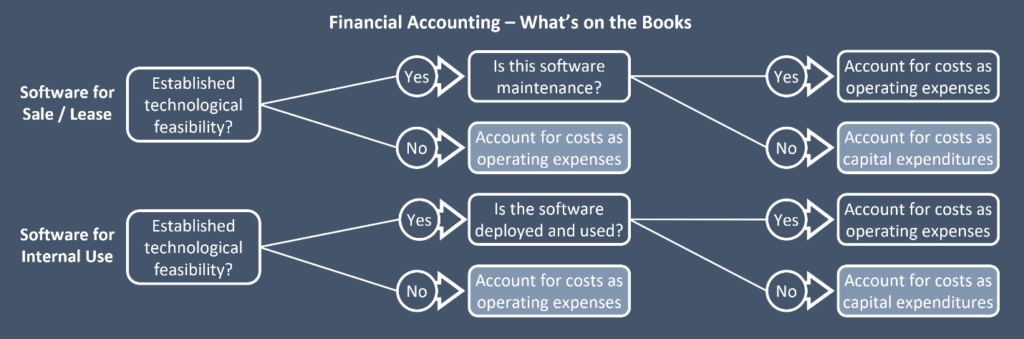
GAAP sets rules for software cost accounting in the U.S. It divides costs into stages: research, development, and post-development. Costs in the research phase must be expensed immediately. Development costs can be capitalized once the project is feasible. Only direct costs, like coding and testing, qualify for capitalization. Overhead and general expenses stay as costs in the period.
Ifrs Considerations
IFRS also separates software costs into phases. Costs before technical feasibility are expensed. Costs after this point may be capitalized if criteria are met. The criteria include probable future economic benefits and reliable measurement of costs. IFRS allows more judgment in deciding which costs to capitalize. Companies must document their decisions carefully for audits.
Amortization And Depreciation
Capitalized software costs are not expenses immediately. They spread out as amortization over the software’s useful life. Amortization reduces the asset value on the balance sheet gradually. Depreciation may apply if software is linked to physical assets. The useful life depends on the software type and usage. Regular review of useful life ensures proper expense timing.
Managing Budget And Forecasting
Managing the budget and forecasting costs are vital parts of software development projects. Keeping track of spending helps avoid surprises. Predicting future expenses supports better planning. Both tasks ensure the project stays on track financially.
Estimating Development Costs
Start by listing all the needed tasks. Include design, coding, testing, and deployment. Assign time estimates for each task. Multiply hours by the hourly rates of the team. Add costs for tools, licenses, and infrastructure. Always include a buffer for unexpected expenses.
Monitoring Budget Variances
Regularly compare actual spending to the planned budget. Identify where spending is higher or lower than expected. Investigate reasons for these differences quickly. Adjust the plan or resource use if needed. This keeps the project financially healthy and on target.
Forecasting Future Expenses
Use current spending patterns to predict upcoming costs. Consider changes like scope shifts or new requirements. Update forecasts regularly to reflect project progress. This helps prepare for any financial challenges ahead. Forecasting keeps the project financially stable and ready for decisions.
Leveraging Software Accounting Tools
Leveraging software accounting tools simplifies tracking and managing software development costs. These tools reduce manual errors and save time. They provide clear insights into expenses, budgets, and resource allocation. Using the right tools helps businesses keep costs under control and improve financial planning.
Choosing The Right Software
Select software that fits your business size and needs. Look for tools with features like expense tracking, invoicing, and budget monitoring. User-friendly interfaces help teams adopt the software quickly. Check if the tool supports multiple currencies and tax rules for global projects.
Integrating With Project Management
Connect accounting tools with project management software. This integration links costs directly to project tasks and timelines. It offers real-time updates on budget use and project expenses. Teams can better coordinate financial and project data in one place.
Automating Cost Reporting
Automate cost reports to save time and increase accuracy. Set schedules for regular reports to track spending trends. Automated alerts notify managers of budget overruns early. Clear reports support faster decision-making and budget adjustments.
Common Challenges And Solutions
Accounting for software development costs involves many common challenges. These challenges can affect budgets and timelines. Understanding these issues helps manage costs better. Solutions exist to handle these problems effectively. This section covers common challenges and practical solutions.
Dealing With Scope Changes
Scope changes happen often during software projects. They can increase costs unexpectedly. Tracking changes carefully is important. Use clear communication to document every change. Update budgets as soon as changes occur. This prevents surprises in the accounting process. Set boundaries early to limit scope creep. Regular meetings help keep the project on track.
Handling Delays And Cost Overruns
Delays can cause budgets to go over. Identifying delays early saves money. Monitor project progress closely. Keep some budget reserved for unexpected costs. Use project management tools to spot risks fast. Communicate with the team to solve issues quickly. Adjust timelines and costs in your records as needed.
Ensuring Compliance And Audit Readiness
Compliance is critical in software cost accounting. Keep all financial records organized and clear. Follow accounting standards strictly. Document all expenses with invoices and receipts. Prepare for audits by reviewing records regularly. Use software tools to track costs and support audits. Clear records reduce risks during reviews.
Credit: foundersib.com
Frequently Asked Questions
What Costs Are Included In Software Development Accounting?
Software development costs include salaries, tools, licenses, and infrastructure expenses. It also covers testing, deployment, and maintenance costs. Accurate allocation helps in proper financial reporting and budgeting.
How To Differentiate Capital Vs. Operational Software Costs?
Capital costs are for software assets with long-term benefits. Operational costs cover day-to-day expenses like support and minor updates. Proper classification impacts tax and financial statements.
When Should Software Development Costs Be Capitalized?
Costs should be capitalized when the project is in the development phase. Research and preliminary stages are expensed. Capitalization continues until the software is ready for use.
How To Track Software Development Costs Effectively?
Use project management tools to log time and expenses. Categorize costs by phase and type. Regular reviews ensure accurate cost allocation and budget control.
Conclusion
Accounting for software development costs helps keep your budget clear and controlled. Track expenses carefully to avoid surprises later. Use simple methods to separate costs like labor, tools, and testing. Knowing where money goes lets you plan better and stay on track.
Keep records updated as the project grows or changes. This way, you understand your spending and make smarter choices. Clear accounting also helps when sharing reports with your team or investors. Stay organized, stay informed, and manage costs with confidence.
